About xZip
xZip is a lightweight archive viewer and extractor for iOS and iPadOS. Browse what's inside before you extract, pull out only the files you need, and move on - no ads, no account, no fuss. FREE FEATURES . Open ZIP, RAR,...
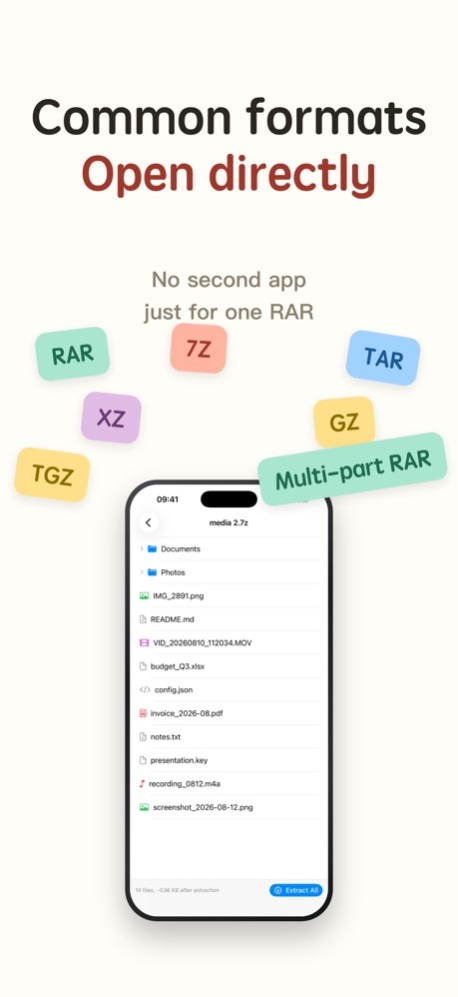
xZip is a lightweight archive viewer and extractor for iOS and iPadOS. Browse what's inside before you extract, pull out only the files you need, and move on - no ads, no account, no fuss. FREE FEATURES . Open ZIP, RAR, 7z, TAR, XZ, GZ, TGZ archives . Browse file trees and folder structures . Extract all files with one tap . Basic compression (ZIP, 7z) . Password-protected archives supported PRO UNLOCK (one-time purchase) . Preview images, PDFs, and text without extracting . Extract individual files on demand . Encrypt compressed files with a password (ZIP & 7z) . Low-memory compression mode for large files . Split multiple files into separate or chunked archives . Works on iPhone, iPad, and Mac with a single purchase FORMATS SUPPORTED . Full preview: ZIP, RAR, 7z, TAR . Quick extract: XZ, GZ, TGZ, TAR.GZ DESIGNED FOR iPad & iPhone . Optimized for iPad multitasking and larger screens . Open archives from Files, Mail, Safari, or AirDrop PRIVACY & PERFORMANCE . Zero ads - not now, not ever . No account, no personal data collected . All processing happens on-device . Lightweight and fast - under 30 MB . VoiceOver supported Built for people who just want to open their files and move on. Privacy Policy: https://blabla-yy.github.io/privacy/xzip-en.html Terms of Use (EULA): https://www.apple.com/legal/internet-services/itunes/dev/stdeula/
Version History New: choose a form or email when sending feedback Improved: smoother when opening archives with many items Improved: interface and icon details Fixed: various issues 1.7.0 Sep 23 New: swipe left or right to flip through images Improved: images open faster and more reliably Fixed: various issues 1.6.4 Sep 10 Improved: faster file preview Improved: files now show a loading state while they open, and a long wait can be cancelled Improved: more text formats can be previewed Fixed: opening a large file on iPad could show the wrong screen 1.6.3 Sep 2 New: xzip can remember an encrypted archive's password, so you don't have to type it again New: a Settings screen for managing defaults New: multiple windows on iPad Improved: free space is checked before extracting, with a warning up front if there isn't enough Improved: when an archive's file list can't be read, you can now extract the whole archive instead Fixed: some files couldn't be previewed Fixed: switching between previews could keep showing the previous file 1.6.2 Aug 25 This update polishes the overall experience and improves how errors are presented, so it's clearer what went wrong. Several known issues have also been fixed. 1.6.1 Aug 17 • New: extract multi-part RAR archives (.part1.rar, .r00) • New: compression can pack each file or folder into its own archive • Improved: compression form interactions and the hints throughout it • Fixed: support for certain compression methods, unexpected loss of file access, and several other known issues 1.6.0 Aug 11 • Fixed known issues • Improved overall user experience 1.5.7 Jul 20 • Improved overall user experience • Fixed known issues • Fixed an issue affecting legacy users unlocking Pro across devices 1.5.6 Jul 13 • Added automatic encoding detection for filename characters • Optimized UI performance and smoothness when browsing archives with a large number of files • Improved ZIP archive parsing speed while significantly reducing memory and CPU usage 1.5.5 Jun 28 Bug fixes and stability improvements. 1.5.4 Jun 19 • Compress with a password to keep your files private (ZIP & 7z) • Large files compress smoothly even on low-memory devices • Split multiple files into one archive, separate packages, or fixed-size chunks • Bug fixes and reliability improvements 1.5.3 Jun 17 • Improved file picker experience when choosing output folders • Fixed extraction issues with certain GZ archives • Better stability for file preview on macOS • Bug fixes and reliability improvements 1.5.2 Jun 11 Redesigned for faster archive browsing: • Browse supported archives before extracting • Preview images, PDFs, and text files • Extract selected files without unpacking everything • Improved file tree navigation and visual design 1.4.0 Jun 3 Fix known issues and optimize user experience. 1.0.2 08/23/2021 1.0.0 08/10/2021
Previous Versions
Here you can find the changelog of xZip since it was posted on our website on 2022-07-28 10:47:51.
The latest version is 1.7.0 and it was updated on 2026-10-07 09:19:06. See below the changes in each version.
xZip version 1.7.0
Updated At: 2026-10-06
Changes: Version History New: choose a form or email when sending feedback
Improved: smoother when opening archives with many items
Improved: interface and icon details
Fixed: various issues 1.7.0 Sep 23 New: swipe left or right to flip through images
Improved: images open faster and more reliably
Fixed: various issues 1.6.4 Sep 10 Improved: faster file preview
Improved: files now show a loading state while they open, and a long wait can be cancelled
Improved: more text formats can be previewed
Fixed: opening a large file on iPad could show the wrong screen 1.6.3 Sep 2 New: xzip can remember an encrypted archive's password, so you don't have to type it again
New: a Settings screen for managing defaults
New: multiple windows on iPad
Improved: free space is checked before extracting, with a warning up front if there isn't enough
Improved: when an archive's file list can't be read, you can now extract the whole archive instead
Fixed: some files couldn't be previewed
Fixed: switching between previews could keep showing the previous file 1.6.2 Aug 25 This update polishes the overall experience and improves how errors are presented, so it's clearer what went wrong. Several known issues have also been fixed. 1.6.1 Aug 17 • New: extract multi-part RAR archives (.part1.rar, .r00)
• New: compression can pack each file or folder into its own archive
• Improved: compression form interactions and the hints throughout it
• Fixed: support for certain compression methods, unexpected loss of file access, and several other known issues 1.6.0 Aug 11 • Fixed known issues
• Improved overall user experience 1.5.7 Jul 20 • Improved overall user experience
• Fixed known issues
• Fixed an issue affecting legacy users unlocking Pro across devices 1.5.6 Jul 13 • Added automatic encoding detection for filename characters
• Optimized UI performance and smoothness when browsing archives with a large number of files
• Improved ZIP archive parsing speed while significantly reducing memory and CPU usage 1.5.5 Jun 28 Bug fixes and stability improvements. 1.5.4 Jun 19 • Compress with a password to keep your files private (ZIP & 7z)
• Large files compress smoothly even on low-memory devices
• Split multiple files into one archive, separate packages, or fixed-size chunks
• Bug fixes and reliability improvements 1.5.3 Jun 17 • Improved file picker experience when choosing output folders
• Fixed extraction issues with certain GZ archives
• Better stability for file preview on macOS
• Bug fixes and reliability improvements 1.5.2 Jun 11 Redesigned for faster archive browsing:
• Browse supported archives before extracting
• Preview images, PDFs, and text files
• Extract selected files without unpacking everything
• Improved file tree navigation and visual design 1.4.0 Jun 3 Fix known issues and optimize user experience. 1.0.2 08/23/2021 1.0.0 08/10/2021
xZip version 1.7.0
Updated At: 2026-09-26
Changes: Version History New: choose a form or email when sending feedback
Improved: smoother when opening archives with many items
Improved: interface and icon details
Fixed: various issues 1.7.0 2d ago New: swipe left or right to flip through images
Improved: images open faster and more reliably
Fixed: various issues 1.6.4 Sep 10 Improved: faster file preview
Improved: files now show a loading state while they open, and a long wait can be cancelled
Improved: more text formats can be previewed
Fixed: opening a large file on iPad could show the wrong screen 1.6.3 Sep 2 New: xzip can remember an encrypted archive's password, so you don't have to type it again
New: a Settings screen for managing defaults
New: multiple windows on iPad
Improved: free space is checked before extracting, with a warning up front if there isn't enough
Improved: when an archive's file list can't be read, you can now extract the whole archive instead
Fixed: some files couldn't be previewed
Fixed: switching between previews could keep showing the previous file 1.6.2 Aug 25 This update polishes the overall experience and improves how errors are presented, so it's clearer what went wrong. Several known issues have also been fixed. 1.6.1 Aug 17 • New: extract multi-part RAR archives (.part1.rar, .r00)
• New: compression can pack each file or folder into its own archive
• Improved: compression form interactions and the hints throughout it
• Fixed: support for certain compression methods, unexpected loss of file access, and several other known issues 1.6.0 Aug 11 • Fixed known issues
• Improved overall user experience 1.5.7 Jul 20 • Improved overall user experience
• Fixed known issues
• Fixed an issue affecting legacy users unlocking Pro across devices 1.5.6 Jul 13 • Added automatic encoding detection for filename characters
• Optimized UI performance and smoothness when browsing archives with a large number of files
• Improved ZIP archive parsing speed while significantly reducing memory and CPU usage 1.5.5 Jun 28 Bug fixes and stability improvements. 1.5.4 Jun 19 • Compress with a password to keep your files private (ZIP & 7z)
• Large files compress smoothly even on low-memory devices
• Split multiple files into one archive, separate packages, or fixed-size chunks
• Bug fixes and reliability improvements 1.5.3 Jun 17 • Improved file picker experience when choosing output folders
• Fixed extraction issues with certain GZ archives
• Better stability for file preview on macOS
• Bug fixes and reliability improvements 1.5.2 Jun 11 Redesigned for faster archive browsing:
• Browse supported archives before extracting
• Preview images, PDFs, and text files
• Extract selected files without unpacking everything
• Improved file tree navigation and visual design 1.4.0 Jun 3 Fix known issues and optimize user experience. 1.0.2 08/23/2021 1.0.0 08/10/2021
xZip version 1.6.4
Updated At: 2026-09-19
Changes: Version History New: swipe left or right to flip through images
Improved: images open faster and more reliably
Fixed: various issues 1.6.4 Sep 10 Improved: faster file preview
Improved: files now show a loading state while they open, and a long wait can be cancelled
Improved: more text formats can be previewed
Fixed: opening a large file on iPad could show the wrong screen 1.6.3 Sep 2 New: xzip can remember an encrypted archive's password, so you don't have to type it again
New: a Settings screen for managing defaults
New: multiple windows on iPad
Improved: free space is checked before extracting, with a warning up front if there isn't enough
Improved: when an archive's file list can't be read, you can now extract the whole archive instead
Fixed: some files couldn't be previewed
Fixed: switching between previews could keep showing the previous file 1.6.2 Aug 25 This update polishes the overall experience and improves how errors are presented, so it's clearer what went wrong. Several known issues have also been fixed. 1.6.1 Aug 17 • New: extract multi-part RAR archives (.part1.rar, .r00)
• New: compression can pack each file or folder into its own archive
• Improved: compression form interactions and the hints throughout it
• Fixed: support for certain compression methods, unexpected loss of file access, and several other known issues 1.6.0 Aug 11 • Fixed known issues
• Improved overall user experience 1.5.7 Jul 20 • Improved overall user experience
• Fixed known issues
• Fixed an issue affecting legacy users unlocking Pro across devices 1.5.6 Jul 13 • Added automatic encoding detection for filename characters
• Optimized UI performance and smoothness when browsing archives with a large number of files
• Improved ZIP archive parsing speed while significantly reducing memory and CPU usage 1.5.5 Jun 28 Bug fixes and stability improvements. 1.5.4 Jun 19 • Compress with a password to keep your files private (ZIP & 7z)
• Large files compress smoothly even on low-memory devices
• Split multiple files into one archive, separate packages, or fixed-size chunks
• Bug fixes and reliability improvements 1.5.3 Jun 17 • Improved file picker experience when choosing output folders
• Fixed extraction issues with certain GZ archives
• Better stability for file preview on macOS
• Bug fixes and reliability improvements 1.5.2 Jun 11 Redesigned for faster archive browsing:
• Browse supported archives before extracting
• Preview images, PDFs, and text files
• Extract selected files without unpacking everything
• Improved file tree navigation and visual design 1.4.0 Jun 3 Fix known issues and optimize user experience. 1.0.2 08/23/2021 1.0.0 08/10/2021
xZip version 1.6.4
Updated At: 2026-09-12
Changes: Version History New: swipe left or right to flip through images
Improved: images open faster and more reliably
Fixed: various issues 1.6.4 1d ago Improved: faster file preview
Improved: files now show a loading state while they open, and a long wait can be cancelled
Improved: more text formats can be previewed
Fixed: opening a large file on iPad could show the wrong screen 1.6.3 Sep 2 New: xzip can remember an encrypted archive's password, so you don't have to type it again
New: a Settings screen for managing defaults
New: multiple windows on iPad
Improved: free space is checked before extracting, with a warning up front if there isn't enough
Improved: when an archive's file list can't be read, you can now extract the whole archive instead
Fixed: some files couldn't be previewed
Fixed: switching between previews could keep showing the previous file 1.6.2 Aug 25 This update polishes the overall experience and improves how errors are presented, so it's clearer what went wrong. Several known issues have also been fixed. 1.6.1 Aug 17 • New: extract multi-part RAR archives (.part1.rar, .r00)
• New: compression can pack each file or folder into its own archive
• Improved: compression form interactions and the hints throughout it
• Fixed: support for certain compression methods, unexpected loss of file access, and several other known issues 1.6.0 Aug 11 • Fixed known issues
• Improved overall user experience 1.5.7 Jul 20 • Improved overall user experience
• Fixed known issues
• Fixed an issue affecting legacy users unlocking Pro across devices 1.5.6 Jul 13 • Added automatic encoding detection for filename characters
• Optimized UI performance and smoothness when browsing archives with a large number of files
• Improved ZIP archive parsing speed while significantly reducing memory and CPU usage 1.5.5 Jun 28 Bug fixes and stability improvements. 1.5.4 Jun 19 • Compress with a password to keep your files private (ZIP & 7z)
• Large files compress smoothly even on low-memory devices
• Split multiple files into one archive, separate packages, or fixed-size chunks
• Bug fixes and reliability improvements 1.5.3 Jun 17 • Improved file picker experience when choosing output folders
• Fixed extraction issues with certain GZ archives
• Better stability for file preview on macOS
• Bug fixes and reliability improvements 1.5.2 Jun 11 Redesigned for faster archive browsing:
• Browse supported archives before extracting
• Preview images, PDFs, and text files
• Extract selected files without unpacking everything
• Improved file tree navigation and visual design 1.4.0 Jun 3 Fix known issues and optimize user experience. 1.0.2 08/23/2021 1.0.0 08/10/2021
xZip version 1.6.3
Updated At: 2026-09-05
Changes: Version History Improved: faster file preview
Improved: files now show a loading state while they open, and a long wait can be cancelled
Improved: more text formats can be previewed
Fixed: opening a large file on iPad could show the wrong screen 1.6.3 2d ago New: xzip can remember an encrypted archive's password, so you don't have to type it again
New: a Settings screen for managing defaults
New: multiple windows on iPad
Improved: free space is checked before extracting, with a warning up front if there isn't enough
Improved: when an archive's file list can't be read, you can now extract the whole archive instead
Fixed: some files couldn't be previewed
Fixed: switching between previews could keep showing the previous file 1.6.2 Aug 25 This update polishes the overall experience and improves how errors are presented, so it's clearer what went wrong. Several known issues have also been fixed. 1.6.1 Aug 17 • New: extract multi-part RAR archives (.part1.rar, .r00)
• New: compression can pack each file or folder into its own archive
• Improved: compression form interactions and the hints throughout it
• Fixed: support for certain compression methods, unexpected loss of file access, and several other known issues 1.6.0 Aug 11 • Fixed known issues
• Improved overall user experience 1.5.7 Jul 20 • Improved overall user experience
• Fixed known issues
• Fixed an issue affecting legacy users unlocking Pro across devices 1.5.6 Jul 13 • Added automatic encoding detection for filename characters
• Optimized UI performance and smoothness when browsing archives with a large number of files
• Improved ZIP archive parsing speed while significantly reducing memory and CPU usage 1.5.5 Jun 28 Bug fixes and stability improvements. 1.5.4 Jun 19 • Compress with a password to keep your files private (ZIP & 7z)
• Large files compress smoothly even on low-memory devices
• Split multiple files into one archive, separate packages, or fixed-size chunks
• Bug fixes and reliability improvements 1.5.3 Jun 17 • Improved file picker experience when choosing output folders
• Fixed extraction issues with certain GZ archives
• Better stability for file preview on macOS
• Bug fixes and reliability improvements 1.5.2 Jun 11 Redesigned for faster archive browsing:
• Browse supported archives before extracting
• Preview images, PDFs, and text files
• Extract selected files without unpacking everything
• Improved file tree navigation and visual design 1.4.0 Jun 3 Fix known issues and optimize user experience. 1.0.2 08/23/2021 1.0.0 08/10/2021
xZip version 1.6.2
Updated At: 2026-08-28
Changes: Version History New: xzip can remember an encrypted archive's password, so you don't have to type it again
New: a Settings screen for managing defaults
New: multiple windows on iPad
Improved: free space is checked before extracting, with a warning up front if there isn't enough
Improved: when an archive's file list can't be read, you can now extract the whole archive instead
Fixed: some files couldn't be previewed
Fixed: switching between previews could keep showing the previous file 1.6.2 2d ago This update polishes the overall experience and improves how errors are presented, so it's clearer what went wrong. Several known issues have also been fixed. 1.6.1 Aug 17 • New: extract multi-part RAR archives (.part1.rar, .r00)
• New: compression can pack each file or folder into its own archive
• Improved: compression form interactions and the hints throughout it
• Fixed: support for certain compression methods, unexpected loss of file access, and several other known issues 1.6.0 Aug 11 • Fixed known issues
• Improved overall user experience 1.5.7 Jul 20 • Improved overall user experience
• Fixed known issues
• Fixed an issue affecting legacy users unlocking Pro across devices 1.5.6 Jul 13 • Added automatic encoding detection for filename characters
• Optimized UI performance and smoothness when browsing archives with a large number of files
• Improved ZIP archive parsing speed while significantly reducing memory and CPU usage 1.5.5 Jun 28 Bug fixes and stability improvements. 1.5.4 Jun 19 • Compress with a password to keep your files private (ZIP & 7z)
• Large files compress smoothly even on low-memory devices
• Split multiple files into one archive, separate packages, or fixed-size chunks
• Bug fixes and reliability improvements 1.5.3 Jun 17 • Improved file picker experience when choosing output folders
• Fixed extraction issues with certain GZ archives
• Better stability for file preview on macOS
• Bug fixes and reliability improvements 1.5.2 Jun 11 Redesigned for faster archive browsing:
• Browse supported archives before extracting
• Preview images, PDFs, and text files
• Extract selected files without unpacking everything
• Improved file tree navigation and visual design 1.4.0 Jun 3 Fix known issues and optimize user experience. 1.0.2 08/23/2021 1.0.0 08/10/2021
xZip version 1.5.7
Updated At: 2026-08-10
Changes: Version History • Fixed known issues
• Improved overall user experience 1.5.7 Jul 20 • Improved overall user experience
• Fixed known issues
• Fixed an issue affecting legacy users unlocking Pro across devices 1.5.6 Jul 13 • Added automatic encoding detection for filename characters
• Optimized UI performance and smoothness when browsing archives with a large number of files
• Improved ZIP archive parsing speed while significantly reducing memory and CPU usage 1.5.5 Jun 28 Bug fixes and stability improvements. 1.5.4 Jun 19 • Compress with a password to keep your files private (ZIP & 7z)
• Large files compress smoothly even on low-memory devices
• Split multiple files into one archive, separate packages, or fixed-size chunks
• Bug fixes and reliability improvements 1.5.3 Jun 17 • Improved file picker experience when choosing output folders
• Fixed extraction issues with certain GZ archives
• Better stability for file preview on macOS
• Bug fixes and reliability improvements 1.5.2 Jun 11 Redesigned for faster archive browsing:
• Browse supported archives before extracting
• Preview images, PDFs, and text files
• Extract selected files without unpacking everything
• Improved file tree navigation and visual design 1.4.0 Jun 3 Fix known issues and optimize user experience. 1.0.2 08/23/2021 1.0.0 08/10/2021
xZip version 1.5.7
Updated At: 2026-07-23
Changes: Version History • Fixed known issues
• Improved overall user experience 1.5.7 2d ago • Improved overall user experience
• Fixed known issues
• Fixed an issue affecting legacy users unlocking Pro across devices 1.5.6 Jul 13 • Added automatic encoding detection for filename characters
• Optimized UI performance and smoothness when browsing archives with a large number of files
• Improved ZIP archive parsing speed while significantly reducing memory and CPU usage 1.5.5 Jun 28 Bug fixes and stability improvements. 1.5.4 Jun 19 • Compress with a password to keep your files private (ZIP & 7z)
• Large files compress smoothly even on low-memory devices
• Split multiple files into one archive, separate packages, or fixed-size chunks
• Bug fixes and reliability improvements 1.5.3 Jun 17 • Improved file picker experience when choosing output folders
• Fixed extraction issues with certain GZ archives
• Better stability for file preview on macOS
• Bug fixes and reliability improvements 1.5.2 Jun 11 Redesigned for faster archive browsing:
• Browse supported archives before extracting
• Preview images, PDFs, and text files
• Extract selected files without unpacking everything
• Improved file tree navigation and visual design 1.4.0 Jun 3 Fix known issues and optimize user experience. 1.0.2 08/23/2021 1.0.0 08/10/2021
xZip version 1.5.5
Updated At: 2026-07-01
Changes: Version History • Added automatic encoding detection for filename characters
• Optimized UI performance and smoothness when browsing archives with a large number of files
• Improved ZIP archive parsing speed while significantly reducing memory and CPU usage 1.5.5 2d ago Bug fixes and stability improvements. 1.5.4 Jun 19 • Compress with a password to keep your files private (ZIP & 7z)
• Large files compress smoothly even on low-memory devices
• Split multiple files into one archive, separate packages, or fixed-size chunks
• Bug fixes and reliability improvements 1.5.3 Jun 17 • Improved file picker experience when choosing output folders
• Fixed extraction issues with certain GZ archives
• Better stability for file preview on macOS
• Bug fixes and reliability improvements 1.5.2 Jun 11 Redesigned for faster archive browsing:
• Browse supported archives before extracting
• Preview images, PDFs, and text files
• Extract selected files without unpacking everything
• Improved file tree navigation and visual design 1.4.0 Jun 3 Fix known issues and optimize user experience. 1.0.2 08/23/2021 1.0.0 08/10/2021
xZip version 1.5.2
Updated At: 2026-06-13
Changes: Version History • Improved file picker experience when choosing output folders
• Fixed extraction issues with certain GZ archives
• Better stability for file preview on macOS
• Bug fixes and reliability improvements 1.5.2 1d ago Redesigned for faster archive browsing:
• Browse supported archives before extracting
• Preview images, PDFs, and text files
• Extract selected files without unpacking everything
• Improved file tree navigation and visual design 1.4.0 Jun 3 Fix known issues and optimize user experience. 1.0.2 08/23/2021 1.0.0 08/10/2021
Disclaimer
Official App Store Link
We do not host xZip on our servers. We did not scan it for viruses, adware, spyware or other type of malware. This app is hosted by Apple and passed their terms and conditions to be listed there. We recommend caution when installing it.
The App Store link for xZip is provided to you by apps112.com without any warranties, representations or guarantees of any kind, so access it at your own risk.
If you have questions regarding this particular app contact the publisher directly. For questions about the functionalities of apps112.com contact us.